Rabbit Font: A Handwritten Touch for Makers
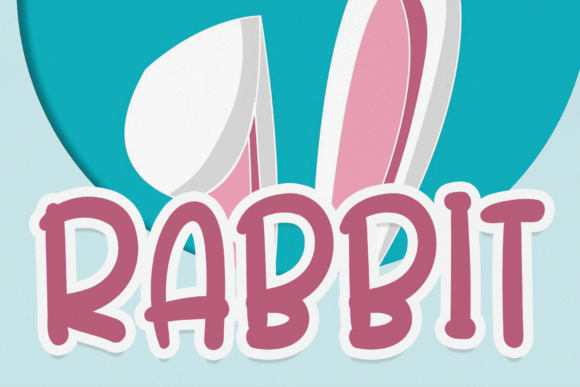
There I was, tracing the edge of a candle label with my finger, thinking about how to make it feel just right. The label needed to be simple but elegant, something that would catch the eye without being too flashy. That’s when I remembered Rabbit—this cool, fresh, and relaxed handwritten font that had been sitting in my design folder for a while. It felt like the perfect fit.
Rabbit is more than just a font; it’s a personality. Its soft curves and casual strokes give it a laid-back vibe that feels approachable and friendly. It’s not overly ornate, but it has a strong visual effect that makes your work stand out. Whether I’m designing a greeting card or printing a sticker sheet, Rabbit adds that extra touch of charm that makes everything feel more personal.
Using Rabbit on Labels and Packaging
One of my favorite ways to use Rabbit is on product labels. For my handmade candles, I often use it for the scent names and ingredient lists. The font’s natural flow makes the text feel like it was written by hand, which gives the product a more artisanal feel. I’ve found that it works especially well on small labels where clarity is key. The letters are distinct enough that even at a glance, you can read what’s written without squinting.
I also love using Rabbit on packaging. When I create boutique-style boxes for my products, I’ll sometimes add a tag with the brand name or a short message. Rabbit gives it that custom, handmade look that really ties everything together. It’s not too bold, so it doesn’t overpower the design, but it still has enough character to make an impression.
Rabbit in Digital Printables and Stationery
For digital printables, Rabbit is a game-changer. I often use it for printable wall art, planner pages, and seasonal cards. The font’s simplicity allows it to work well in a variety of designs, from minimalist layouts to more decorative pieces. I’ve used it on birthday invitations and wedding welcome signs, and it always brings a sense of warmth and personality to the design.
When working with Cricut or Silhouette machines, I’ve found that Rabbit is easy to cut. The font’s clean lines and consistent spacing make it ideal for stickers and vinyl projects. I’ve made custom stickers with Rabbit for my shop, and they’ve been popular with customers who love the handmade aesthetic.
Pairing Rabbit with Other Fonts
While Rabbit shines on its own, it also pairs beautifully with other fonts. I often pair it with a clean sans serif font for a modern contrast, or with a simple serif font for a more traditional look. It works well as a display font, especially for titles or headings, but it can also be used for longer text if needed. Just keep in mind that because it’s a handwritten style, it may not be the best choice for long paragraphs.
When designing for print, I always check the font’s file formats and licensing. Rabbit comes in multiple styles, including regular, bold, and alternate versions, which gives me flexibility. I’ve used it on mugs, shirts, and tote bags, and it looks great in both digital and physical formats.
Real-World Examples of Rabbit in Action
Let me share a few examples of how I’ve used Rabbit in my shop. For a recent holiday collection, I created a set of printable tags with Rabbit for gift wrapping. The font added a personal touch that made the tags feel special. I also used it on farmhouse signs for a rustic-themed project, and it gave the design that cozy, homemade feel I was going for.
Another time, I designed a set of printable wall art for a seasonal sale. Using Rabbit for the main text made the artwork feel more inviting and expressive. It worked well with the overall design, and customers loved the way it looked on their walls.
Considerations for Designers and Sellers
If you’re planning to use Rabbit in your shop, there are a few things to keep in mind. First, make sure to check the font’s commercial license if you’re selling physical products, printables, or digital downloads. Some fonts have restrictions that could affect your business.
Also, consider the context in which you’ll use the font. Rabbit is best suited for short phrases, names, or decorative elements rather than long blocks of text. It’s perfect for product labels, greeting cards, and signage, but it might not be the best choice for body copy in a magazine or website.
Finally, don’t forget to test the font in different sizes and formats. Whether you’re printing a label or creating a mockup, seeing how Rabbit looks in real life will help you make better design decisions.
Overall, Rabbit is a versatile and appealing font that adds a unique touch to any project. As a maker, I find it incredibly useful for everything from candle labels to digital printables. Its warm, creative energy makes it a favorite in my design toolkit, and I can’t wait to see how I’ll use it in future projects.